Ask a developer how many hours they have this sprint and you will usually hear "forty". Ask what they can actually commit to and the number drops by almost half. That gap is where deadlines go to die.
This post shows a simple way to plan engineering capacity from the hours that are really available, without counting commits, lines of code or tickets closed.
Why commit counts mislead
Commits measure activity, not capacity. A developer who spends a day unblocking three teammates may ship nothing, and still be the most valuable person on the team that day. If you plan from output alone, that day looks wasted.
Capacity planning flips the question. Instead of "how much did they produce?" it asks "how much focused time is truly left after everything else?"
Where the week actually goes
Illustrative scenario (not a real client): one developer in a 40-hour sprint week.
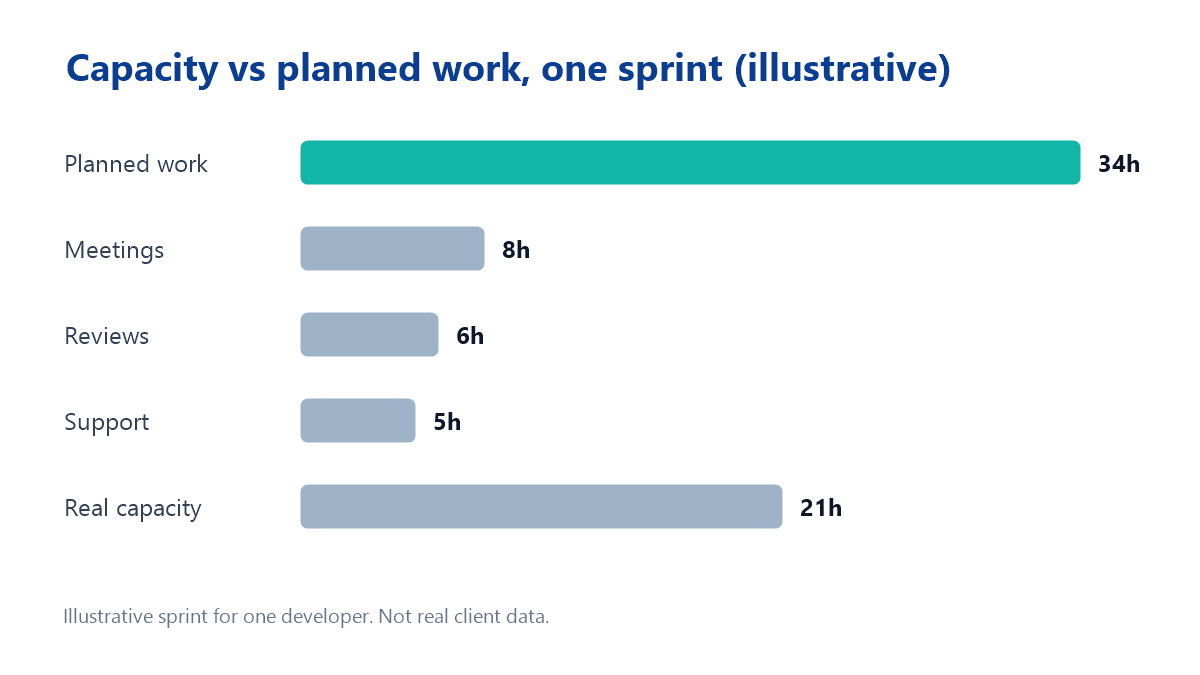
In this example the sprint was planned at 34 hours of work. Meetings (8h), code reviews (6h) and support (5h) take 19 hours before a single ticket is touched. Real capacity is about 21 hours, so the plan is over-committed by 13 hours from day one.
Build a capacity view in 4 steps
| Step | What to do | Output |
|---|---|---|
| 1. Start | Begin from available hours, minus leave and holidays | Gross hours |
| 2. Subtract | Remove meetings, reviews and support load | Net focus hours |
| 3. Plan | Commit only to what fits in net hours | Realistic sprint |
| 4. Review | Compare the plan with reality every week | Better estimates |
Signals worth watching
- Review queue age: pull requests waiting more than two days slow everyone.
- Meeting creep: if meeting hours rise two sprints in a row, capacity is shrinking silently.
- After-hours work: a steady rise means the plan is being paid for with evenings.
- Context switches: many short tasks per day cost more than the hours suggest.
What to leave out
Keystroke counts, green status dots and commit totals tell you about activity. Use them, if at all, as context for a conversation, never as a score.
FAQ
Is capacity planning the same as time tracking? No. Time tracking records what happened. Capacity planning decides what to commit to before it happens. They work best together.
How often should we update capacity? Every sprint, and any time a big meeting block or on-call rotation changes.
What if the team's capacity is lower than leadership expects? Show the subtraction table. It turns an argument into arithmetic.
Try it with real data
If you want focus time and workload trends for your own team in one place, explore workforce analytics from We360.ai, or start a free trial and see where your team's hours go.
About the author
- We360.ai is employee productivity monitoring software. We360.ai helps workplace to enhance productivity & employee engagement.
Comments
Join the discussionNo comments yet. Be the first to comment.